In today’s digital landscape, mobile apps have become an essential part of our daily lives. For Android developers, creating apps that run smoothly and efficiently is crucial. With countless apps available, ensuring your app stands out requires optimization for performance and user experience. In this guide, we’ll explore the best techniques for optimizing Android apps.
Understanding Android App Optimization
Before diving into optimization techniques, it’s important to understand what Android app optimization entails. Essentially, it involves enhancing the performance, speed, and efficiency of an app while minimizing resource usage. This can lead to a better user experience, higher app ratings, and increased user retention.
The Importance of Optimization
Optimization is not just about speed; it’s about creating an app that feels intuitive and responsive. Users expect apps to launch quickly, respond instantly, and provide a seamless experience. Poorly optimized apps can lead to user frustration, negative reviews, and ultimately, uninstalls. Therefore, understanding the nuances of optimization can significantly impact your app’s success.
Common Challenges in Optimization
Optimizing an Android app is not without its challenges. Developers often face issues related to hardware limitations, varying screen sizes, and diverse Android versions. Identifying and addressing these challenges early in the development process can save time and resources in the long run. Moreover, competition in the app market demands that developers continuously update and refine their optimization strategies.
Benefits of a Well-Optimized App
A well-optimized app can lead to numerous benefits, including improved user engagement, higher retention rates, and increased revenue. Efficient apps are more likely to receive positive reviews and recommendations, which can boost their visibility in app stores. Additionally, optimized apps consume fewer device resources, enhancing battery life and overall device performance.
Key Techniques for Optimizing Android Apps
1. Efficient Coding Practices
To optimize your Android app, start with efficient coding. Use clean, readable, and maintainable code. Adopt best practices like avoiding redundant code, using appropriate data structures, and leveraging Android’s built-in libraries for common tasks.
Emphasizing Code Readability
Readable code is easier to maintain and debug. It allows other developers (and your future self) to understand and modify code with minimal effort. Consistent naming conventions, proper indentation, and comprehensive comments are key components of readable code. When your code is easy to read, it’s also easier to optimize.
Utilizing Built-in Libraries
Android provides a wealth of built-in libraries that can simplify and optimize development tasks. These libraries are designed to handle common tasks efficiently, saving you time and effort. By leveraging these libraries, you reduce the risk of introducing errors and inconsistencies, and you ensure that your app adheres to Android’s best practices.
Avoiding Redundancies
Redundant code can bloat your app and slow down performance. Regular code reviews and refactoring sessions can help identify and eliminate unnecessary code. Tools like lint can also assist in detecting redundant or inefficient code structures, guiding you towards a cleaner and more efficient codebase.
2. Optimize Layouts
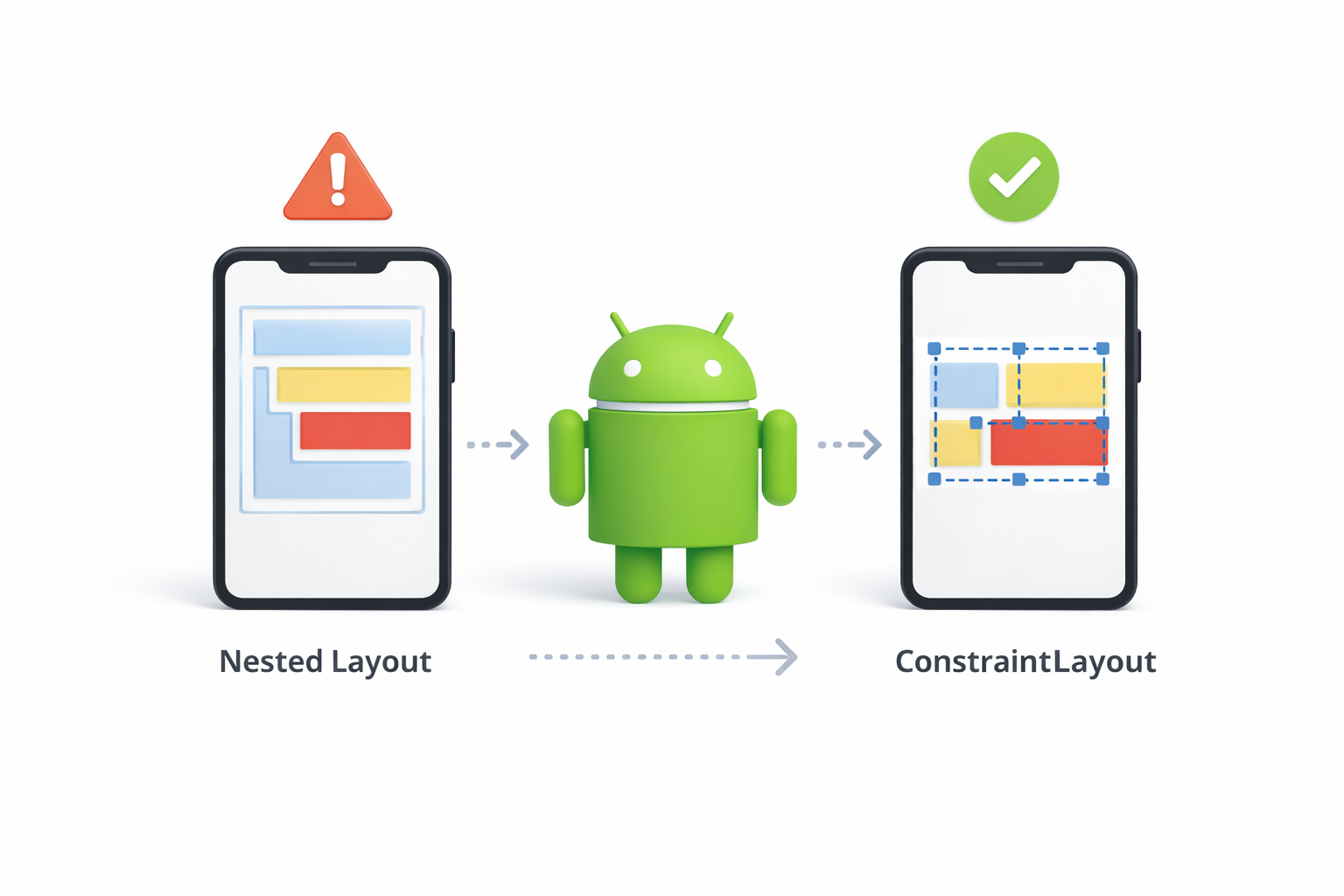
Layouts play a significant role in app Layouts play a significant role in app performance. Use Android’s ConstraintLayout to reduce the complexity of your views and minimize nested layouts. This approach can help improve your app’s rendering speed and responsiveness.
Understanding Layout Rendering
Understanding how Android renders layouts can help you optimize them effectively. Android layouts are hierarchical, meaning they require more processing power when they are deeply nested. By minimizing hierarchy, you reduce the workload on the rendering engine, which translates to faster load times and improved performance.
Choosing the Right Layout
Different layout options are available in Android, each with its strengths and weaknesses. While LinearLayout and RelativeLayout offer flexibility, ConstraintLayout is often more efficient for complex UIs. It allows you to create flat layouts with fewer nesting levels, enhancing performance.
Tools for Layout Optimization
Tools like Layout Inspector and Hierarchy Viewer can provide insights into your layout’s structure and performance. They help you visualize the hierarchy and identify bottlenecks. By using these tools, you can make informed decisions on how to optimize your app’s UI for better performance.
3. Reduce App Size
Large app sizes can deter users from downloading your app. Optimize images by using formats like WebP and compressing resources. Implement code shrinking tools like ProGuard or R8 to remove unused code and resources, reducing the final APK size.
Image Optimization Techniques
Images often constitute a significant portion of an app’s size. By using efficient formats like WebP, you can maintain image quality while reducing file size. Tools like ImageMagick or online compressors can further optimize your images without noticeable quality loss.
Code Shrinking with ProGuard and R8
ProGuard and R8 are powerful tools for reducing app size. They work by removing unused code and resources, which can significantly reduce the APK size. These tools also obfuscate code, making it harder for unauthorized users to reverse engineer your app.
Managing Resource Files
Resource files, including strings, layouts, and assets, can bloat your app if not managed properly. Regularly audit these files to remove any that are no longer used. Additionally, consider using resource qualifiers to provide only the necessary resources for different device configurations.
4. Minimize Memory Usage
Efficient memory management is crucial for Android app optimization. Use memory-efficient data structures and avoid memory leaks by managing resources properly. Tools like Android Profiler can help identify memory usage issues in your app.
Identifying Memory Leaks
Memory leaks occur when an app retains memory that it no longer needs, leading to increased memory consumption and potential crashes. Tools like LeakCanary can automatically detect memory leaks, allowing you to address them promptly.
Choosing Efficient Data Structures
Selecting the appropriate data structures can have a significant impact on memory usage. For example, using SparseArray instead of HashMap can save memory when dealing with primitive types. Understanding the trade-offs between different data structures will help you make informed decisions.
Best Practices for Memory Management
To manage memory effectively, avoid holding strong references to context objects, use weak references where appropriate, and ensure that resources are released when no longer needed. Regularly testing your app on devices with limited memory can help you identify and fix potential issues.
5. Leverage Background Services Wisely
Background services can consume significant resources. Use them sparingly and ensure they’re necessary for your app’s functionality. Consider using WorkManager for scheduling background tasks efficiently, reducing resource consumption.
Understanding Background Service Limitations
Background services are essential for tasks like music playback or location tracking, but they can drain battery and consume data. Understanding the limitations and impact of background services will help you implement them responsibly.
Alternatives to Background Services
For many tasks, alternatives like JobScheduler, WorkManager, or Firebase Cloud Messaging can offer more efficient solutions. These tools are designed to handle background tasks with minimal resource impact, ensuring that your app remains responsive and battery-friendly.
Scheduling Tasks Efficiently
Scheduling tasks at the right time can further optimize your app’s performance. Avoid running background tasks during peak device usage, and consider deferring non-essential tasks to times when the device is idle or charging.
6. Optimize Network Requests
Network requests can impact app performance. Batch multiple requests together, use efficient data formats like JSON, and implement caching to reduce network latency. The OkHttp library can be a valuable tool for optimizing network operations.
Batching Network Requests
By batching multiple network requests, you can reduce the number of connections and improve efficiency. This approach is particularly useful when dealing with APIs that support bulk operations, reducing the overhead associated with multiple individual requests.
Implementing Caching Strategies
Caching can dramatically improve your app’s performance by reducing the need for repeated network calls. Implementing HTTP caching strategies ensures that your app uses cached data whenever possible, minimizing latency and improving load times.
Choosing the Right Data Format
The choice of data format for network communications can affect both performance and data size. JSON is widely used due to its balance of readability and efficiency. However, for specific use cases, formats like Protocol Buffers or MessagePack might offer better performance.
7. Enhance Battery Efficiency

Battery drain is a common complaint among app users. To enhance battery efficiency, reduce unnecessary background activity and limit the frequency of updates. Tools like Battery Historian can help identify battery-draining components in your app.
Monitoring Battery Usage
Monitoring your app’s battery usage is essential for identifying areas of improvement. Tools like Battery Historian can provide detailed reports on your app’s power consumption, allowing you to pinpoint and address inefficiencies.
Reducing Background Activity
Limiting background activity is crucial for enhancing battery life. Evaluate which processes truly need to run in the background and eliminate any that don’t. Consider using alarms and timers judiciously to prevent unnecessary wake-ups.
Efficient Use of Hardware Features
Using hardware features like GPS or sensors can drain battery quickly. Implement strategies to minimize their usage, such as reducing location update frequency or using lower accuracy settings when high precision is not needed.
8. Use No-Code App Builders
For those not well-versed in coding, no-code app builders like nandbox provide a user-friendly platform for creating Android apps. These tools allow you to build native apps with optimized performance without writing complex code.
Advantages of No-Code Solutions
No-code app builders democratize app development by enabling users without technical backgrounds to create fully functional apps. They offer drag-and-drop interfaces, pre-built templates, and integrations, making app development accessible to everyone.
Optimizing with No-Code Platforms
Despite their simplicity, no-code platforms are equipped with tools to ensure app optimization. They offer features like automated performance checks and resource management, helping users create efficient apps without diving into complex coding practices.
Limitations and Considerations
While no-code solutions are powerful, they may not offer the same level of customization as traditional coding. It’s important to evaluate whether a no-code platform meets your app’s specific needs and consider the trade-offs between ease of use and flexibility.
Advanced Techniques for Android App Optimization
9. Implement Lazy Loading
Lazy loading can significantly improve app performance by loading content only when needed. This technique reduces initial loading times and improves the overall user experience.
Benefits of Lazy Loading
Lazy loading defers the loading of non-critical resources until they are needed, improving initial load times and reducing memory usage. This technique is particularly beneficial for apps with heavy image or video content, as it prevents unnecessary resource consumption.
Implementing Lazy Loading in Android
Android offers various techniques for implementing lazy loading, such as RecyclerView for lists and Glide or Picasso for images. These libraries simplify the process of loading and displaying content on demand, ensuring a smooth and responsive user experience.
Common Challenges and Solutions
Implementing lazy loading can present challenges, such as managing loading states and handling user interactions. Addressing these challenges requires thoughtful design and testing to ensure that content loads seamlessly without disrupting the user experience.
10. Use Native Android App Builders
Native Android app builders offer tools and resources specifically designed for Android development. These builders can help optimize app performance by providing pre-built components and ensuring compatibility with various Android versions.
Advantages of Native Builders
Native app builders are tailored to the Android ecosystem, offering components and tools that maximize performance and compatibility. They provide access to the latest Android features and updates, ensuring that your app remains current and efficient.
Popular Native Android Builders
There are several native Android app builders available, each with its strengths. Tools like Android Studio provide robust environments for app development, offering features like code analysis, debugging, and performance monitoring to optimize your app.
Ensuring Compatibility
One of the key challenges in Android development is ensuring compatibility across diverse devices and Android versions. Native builders offer tools to test and optimize your app’s performance on different devices, reducing fragmentation issues and enhancing user experience.
11. Monitor App Performance
Regularly monitor your app’s performance using tools like Firebase Performance Monitoring or Android Vitals. These tools provide insights into app crashes, slow rendering, and other performance issues, allowing you to address them promptly.
The Role of Performance Monitoring

Performance monitoring is crucial for identifying and addressing performance bottlenecks. By continuously tracking your app’s performance, you can detect issues early and implement solutions before they impact users.
Tools for Performance Monitoring
There are various tools available for monitoring app performance, each offering unique features. Firebase Performance Monitoring provides real-time insights into app performance metrics, while Android Vitals offers detailed reports on stability and performance issues.
Interpreting and Acting on Data
Collecting performance data is only the first step; interpreting and acting on it is where the real value lies. Use the insights gained from performance monitoring to prioritize optimizations, focusing on areas with the greatest impact on user experience.
12. Keep Up with Android Updates
Staying updated with the latest Android developments and updates is crucial for optimizing your app. New Android versions often come with performance enhancements and new features that can benefit your app.
Importance of Staying Current
Android updates often include improvements in performance, security, and user experience. By staying current, you ensure that your app benefits from these enhancements and remains compatible with the latest devices and features.
Leveraging New Features
Each Android update introduces new features and APIs that can enhance your app’s functionality and performance. By integrating these features, you can offer users a more modern and efficient app experience.
Addressing Compatibility Issues
With each new version, there’s potential for compatibility issues with older code. Regularly testing your app against new Android releases helps identify and address these issues early, ensuring a smooth transition and optimal performance.
Conclusion
Optimizing Android apps is essential for delivering a seamless user experience and staying competitive in the app market. By implementing these techniques, from efficient coding practices to leveraging no-code app builders, you can enhance your app’s performance and user satisfaction. Remember, continuous monitoring and improvement are key to maintaining an optimized app.
Incorporating these strategies into your Android development process will ensure your app not only runs efficiently but also stands out among the competition. Whether you’re a seasoned developer or using a no-code platform like nandbox, these optimization techniques will guide you in creating high-performance Android apps.