Creating your own app is now a reality, even without codhttps://nandbox.com/how-to-create-yo…t-coding-in-2026/ing knowledge. With the right focus and planning, anyone can transform an idea into a functional app. The key is understanding that a clear scope is more important than advanced technical skills. Instead of attempting to build a complex application all at once, start with a Minimum Viable Product (MVP). An MVP is a simplified version of your app that delivers core features and value to users.
In this step-by-step guide, you will learn how to effectively create your own app by identifying a specific problem to solve. We’ll explore the paths you can take, from using no-code tools to hiring professionals. By the end of this article, you will have the knowledge to embark on your app development journey with confidence.
The 3 Ways to Create Your Own App
When it comes to creating your app, the method you select will greatly impact your budget, timeline, and level of customization. Each approach has its advantages and trade-offs, so understanding them will help you choose the best path for your needs.
Path 1: Using No-Code App Builders
Cost Implications: No-code app builders are typically the most affordable option. Most platforms charge a subscription fee that ranges from $25 to $300 per month, depending on the features and capabilities they offer.
Timeline Differences: This method allows for rapid development. You can usually complete the basic version of your app in weeks or even days, enabling you to launch quickly.
Control/Customization Level: While no-code tools provide a wide array of pre-built components, they offer limited customization. You can design the user interface and workflows but may encounter constraints when trying to implement highly specialized features.
Technical Skill Required: Learning to use a no-code app builder requires minimal technical skills. If you can navigate basic digital interfaces, you can create your app.
Path 2: Hiring Developers
Cost Implications: Hiring developers can vary significantly in price. A freelancer may charge $5,000 to $25,000 for a Minimum Viable Product (MVP), while agencies may charge anywhere from $50,000 to over $250,000 for complex, fully customized applications.
Timeline Differences: The timeline for this route is longer, often taking several months to complete. Complex features and customization can extend development time, especially if multiple iterations are necessary.
Control/Customization Level: When you hire developers, you gain maximum flexibility and control over your app. You can dictate every aspect of the design, functionality, and user experience. However, this level of customization comes at a higher cost and time commitment.
Technical Skill Required: You do not need technical skills if you hire a developer, but having a basic understanding of the development process can improve communication and project management.
Path 3: Learning to Code
Cost Implications: Learning to code incurs lower immediate costs but may require investment in online courses, books, or other educational resources. However, long-term, this path can save money by allowing you to create and maintain your app independently.
Timeline Differences: This is generally the slowest route. Depending on your dedication and the complexity of the app you’re building, it could take months or even years to gain the necessary skills and complete your project.
Control/Customization Level: Building from scratch gives you ultimate control over every aspect of your app. You can create exactly what you envision without limitations imposed by platforms or developers.
Technical Skill Required: This path requires substantial technical knowledge, including programming languages and development concepts. It’s an ideal choice for those willing to invest time and effort into learning.
Decision Summary
Choosing the right path to create your app depends on your specific goals, budget, and timeline. If you seek a quick and cost-effective solution, no-code app builders might be your best bet. If you have a unique idea requiring custom solutions and can invest the necessary funds, hiring developers could be more suitable. Finally, if you aim for total control and are willing to invest time in learning, coding may be the ideal option. Reflect on your priorities, resources, and willingness to learn, and select the path that aligns best with your vision for building an app.
Path 1 Deep Dive: What Are ‘No-Code’ App Builders, Really?
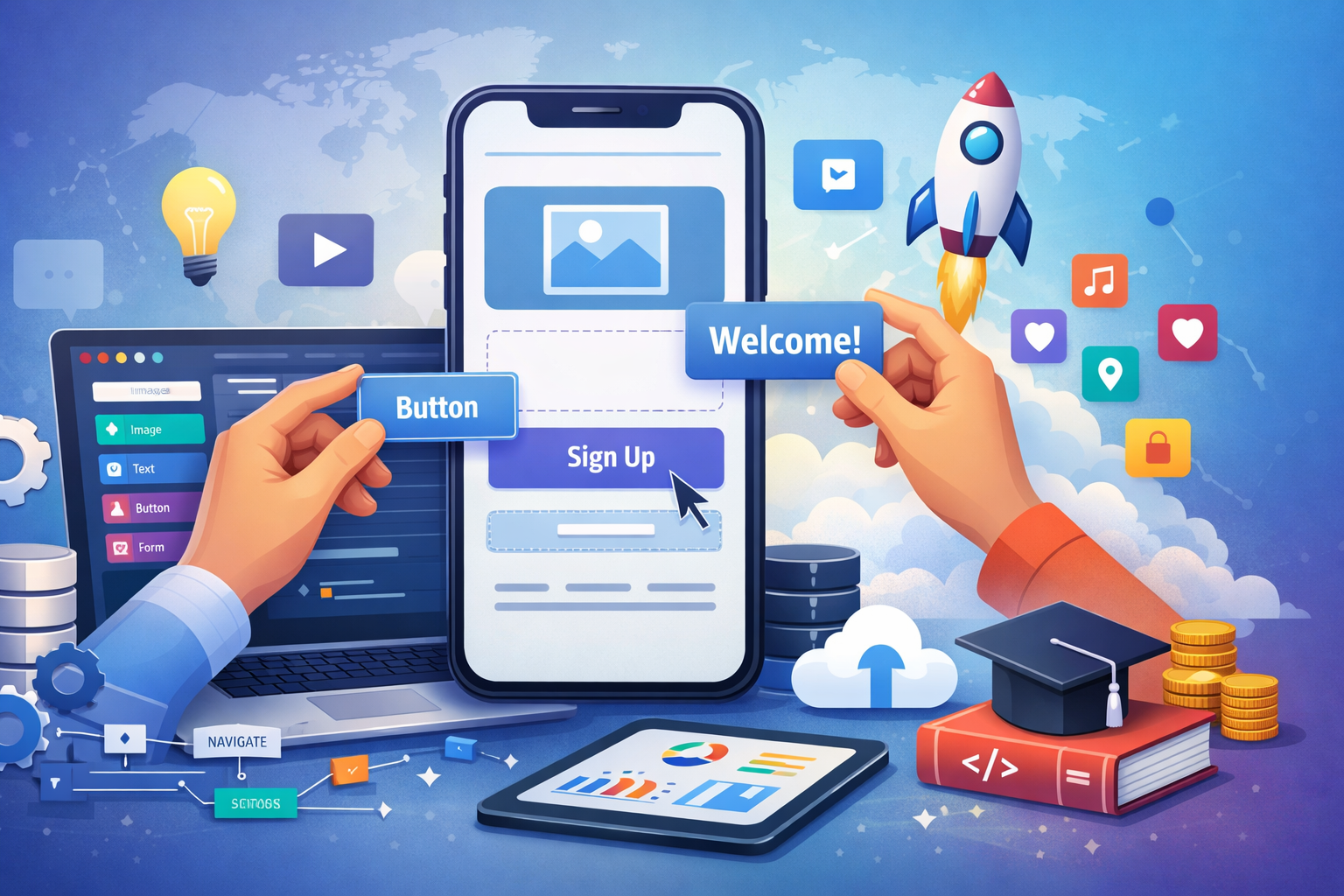
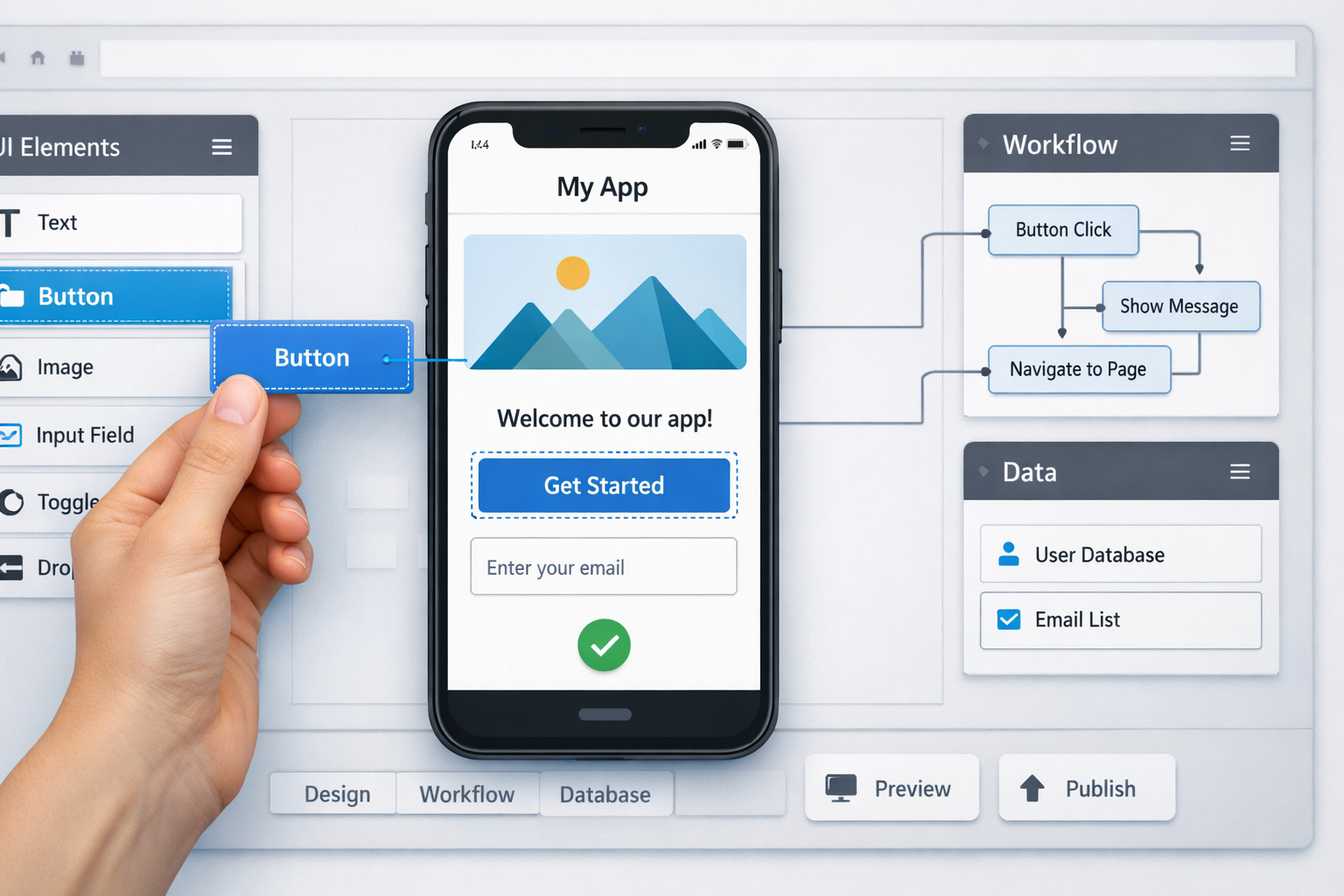
No-code app builders allow users to create their own app without needing programming skills. These platforms utilize intuitive interfaces and visual tools to simplify the app development process, making it accessible for everyone.
Visual Editor
The Visual Editor is a central feature of no-code app builders. It enables users to design the app’s interface by dragging and dropping elements like buttons, text fields, and images. This user-friendly process allows immediate feedback as creators shape their app’s appearance.
Workflows
After designing the interface, users must establish workflows. These are logic rules that dictate how the app responds to user actions. For example, a user can set up a rule to save data when a button is clicked, enabling interactive features without code.
Backend Management
Backend management is crucial for app development, handling data storage and user interactions. No-code platforms automate this process, offering built-in databases and server management to ensure smooth operation. This allows users to focus on app creation rather than backend complexities.
Types of Apps Generated
No-code platforms can produce various types of applications. Some generate web-based apps, while others create hybrid or true native apps. True native apps utilize device capabilities for better performance, such as nandbox, which generates native mobile apps using visual configuration tools.
Why No-Code Works for First-Time Creators
No-code app builders eliminate barriers that often prevent aspiring developers from realizing their ideas. They enable first-time creators to concentrate on design and functionality rather than technical challenges. This empowers individuals to innovate and launch apps in today’s digital landscape.
Native vs Web vs Hybrid Apps: What Type of App Are You Creating?
Web app: Web apps are essentially mobile-optimized websites accessed through a browser. They do not require installation and are built using standard web technologies such as HTML, CSS, and JavaScript.
Hybrid app: Hybrid apps combine elements of web apps and native apps. They are built with web technologies but wrapped in a native shell, enabling installation on devices.
Native app: True native apps are developed specifically for a platform like iOS or Android using platform-specific languages. These apps provide the best performance and access to device features.
| Feature | Web App | Hybrid App | Native App |
|---|---|---|---|
| Install Required | No | Yes | Yes |
| Offline Support | Limited | Moderate | Full |
| Push Notifications | Not supported | Supported | Supported |
| Device Features | Limited | Some access | Full access |
| Performance | Slower | Moderate | Fast |
| App Store Publishing | Not applicable | Yes | Yes |
Quick Pick
- Choose Web if you want easy access without installation and your app relies on simple functions.
- Choose Hybrid if you need some native capabilities while maintaining flexibility and lower development costs.
- Choose Native if you require high performance, full device feature access, and plan to publish on app stores.
In summary, understanding the differences between these app types will help you determine the best path to take when you create your own app. Platforms like nandbox can generate true native apps using visual configuration tools, allowing for streamlined development.
What Can You Actually Build With No-Code Tools in 2026?
Let’s move past the old idea that these tools are just for simple websites. Today’s powerful no-code platforms can handle surprisingly complex projects. You can build a marketplace for local artists, a custom booking system for your service, or a private social network for your community club. For many entrepreneurs, a mobile app builder tool is often the best app builder for small business because it can create robust internal tools—like inventory trackers or project management boards—that are perfectly tailored to their needs without the high cost of custom development. These platforms excel at building applications driven by data, user accounts, and logical workflows.
However, it’s important to understand the trade-offs. Think of a no-code platform as an incredibly well-stocked workshop. You can build almost anything with the tools and materials provided, but you can’t invent a brand-new tool that isn’t on the shelf. This means highly specialized apps, like graphically-intense 3D games or apps requiring deep access to a phone’s specific hardware (like a professional-grade camera app using unique sensor data), are generally not a good fit. If your core idea depends on a unique technological function that doesn’t already exist as a pre-built feature, you’ll likely hit a ceiling.
So, is this a path for serious projects? Absolutely. Many successful startups, some of which have gone on to raise millions in funding, began their journey on a no-code platform before ever writing a line of code. They proved their concept, found their first customers, and generated revenue using these very tools. Now, with the rise of the AI app maker, these platforms are becoming even smarter, helping you build faster than ever. This approach allows you to test your big idea in the real world quickly and affordably, which is why choosing the right one is your critical next step.
How to Choose Your First No-Code Tool: A Quick Guide
Choosing the right no-code app builder is crucial and largely depends on your app’s purpose and architecture. Different tools cater to specific needs and capabilities, so it’s essential to evaluate your project requirements carefully before making a decision. Here’s a structured decision framework to help you choose the most suitable no-code app maker for your project.
1. App Type (Web vs. Hybrid vs. Native)
The first step is determining the type of app you want to create. Web apps run in browsers and are easy to access; however, they may have limited offline capabilities and device feature access. Hybrid apps combine web technologies with a native shell, allowing some device integration while retaining the flexibility of web technologies. True native apps are developed specifically for a platform and offer full access to device features and better performance. Consider what type of user experience you want to deliver and how critical features like push notifications and offline access are for your app.
2. Data Complexity
Consider the data requirements of your app. If your app will handle simple data, such as displaying text or images, many no-code app builders can accommodate this with ease. However, if you require complex data management, such as user accounts, dynamic content updates, or real-time data processing, choose an app builder that offers robust backend capabilities, such as built-in databases and workflow automation. Understanding your data architecture needs will guide your choice of a no-code app builder effectively.
3. Publishing Requirements (App Store / Google Play)
Depending on your objectives, publishing requirements may play a significant role in your decision. If you aim to publish your app on platforms like the App Store or Google Play, ensure that the no-code app builder you choose supports native app creation and adheres to each platform’s guidelines. Some platforms, such as nandbox, enable the creation of native mobile apps through visual configuration tools, which can simplify the publishing process and ensure compliance with app store regulations.
4. Long-Term Scalability
Finally, consider your app’s potential for growth. Choose a no-code app builder that can adapt to your evolving needs over time. If your app gains traction and you anticipate the need for additional features or scaling up, it’s important to select a platform that allows for easy upgrades and enhancements. Some no-code solutions offer scalable infrastructure and integration options, making it easier to expand functionalities without needing to start over or switch platforms down the line.
In summary, the right no-code app builder for you will depend on your specific app requirements, including the type of app, data complexity, publishing needs, and long-term scalability. By evaluating these criteria thoughtfully, you can make an informed decision that aligns with your goals to create your own app effectively.
When Should You Hire a Developer and What Will It Cost?
Knowing when to hire an app developer is crucial to the success of your project. Here are some situations where hiring a developer may be necessary:
- Complex Functionality: If your app requires unique features that cannot be achieved with no-code tools, hiring a developer is essential.
- High User Volume: For apps expected to handle large user traffic or data, a developer can ensure the app is scalable and performs well.
- Tight Deadlines: If you have a specific launch date that requires faster completion, a developer can accelerate the process.
- Custom Design Requirements: If your app needs specialized UI/UX design that goes beyond standard templates, consider hiring a developer.
- Integration Needs: If your app must integrate with existing systems or third-party APIs, a developer can manage these technical requirements effectively.
Freelancer vs Agency
When deciding between hiring a freelancer or an agency, consider the scale and complexity of your project. Freelancers are often more affordable and suitable for smaller projects or specific tasks. In contrast, agencies provide a full team and comprehensive services, making them ideal for larger, more complex projects. However, agencies typically come at a higher cost.
Realistic Cost Ranges
- No-Code DIY: For those who choose a no-code approach, expect to pay between $25 and $300 per month for subscription fees. This route is ideal for creating simple apps quickly and cost-effectively.
- Freelancer MVP: Hiring a freelancer to create a Minimum Viable Product (MVP) can range from $5,000 to $25,000. This depends on app complexity and features required.
- Agency Custom Build: Working with an agency for a fully customized app can range from $50,000 to $250,000 or more. This path provides comprehensive support and higher customization.
Ongoing Maintenance Costs
After initial development, apps require ongoing maintenance, which generally costs 15-20% of your initial budget per year. This covers updates, bug fixes, and system upgrades, ensuring that your app continues to function smoothly and remains compatible with new operating systems.
By understanding the costs involved, you can make informed decisions that align with your goals to create your own app. Now that you understand cost, let’s clarify what parts actually make up an app.
Can You Really Create Your Own App for Free?
Creating your own app may seem like an enticing prospect when you hear about “free” options. However, it is essential to understand what “free” truly means in the context of app development. Here’s a breakdown of the realities surrounding free app creation:
Free to Prototype: Yes!
Many no-code app builders offer free tiers that allow you to prototype your app. These free plans often come with limited features, enabling you to test your ideas and create a basic version without incurring any costs.
Free to Publish on the App Store: No!
While you can build an app without spending money, publishing it on the App Store requires joining the Apple Developer Program, which has an annual fee. For Android, you will also need to register as a developer on Google Play, which incurs a one-time registration fee.
Free Hosting: Usually Limited
Most no-code platforms provide some form of free hosting for prototypes. However, these free hosting options often come with restrictions on data storage, bandwidth, or features. Once your app grows and requires more resources, upgrading to a paid plan may be necessary.
Free Push Notifications: Depends on Platform
Push notifications can be a vital feature for engaging users, but whether they are free depends on the platform you choose. Some no-code tools may limit the number of push notifications sent or charge for this feature as your user base grows.
Free Forever: Rare for Serious Apps
While some platforms may promote free usage, it is rare to find a reliable no-code solution that offers a “free forever” plan suitable for serious applications. Over time, as your needs expand, you will likely encounter costs related to hosting, features, and maintenance.
In conclusion, while it is possible to start building an app for free and prototype your ideas without upfront investment, there are inevitable costs associated with publishing, hosting, and scaling your application. Understanding these aspects will help you better prepare for the financial commitments involved in bringing your app vision to life.
Demystifying the Components of Your App: Front-End vs. Back-End
Front-End
The front-end is the user interface of an app that users interact with directly. It includes everything users see on their screens, such as buttons, text, and images. Front-end development involves using languages like HTML, CSS, and JavaScript to create an engaging visual experience.
Back-End
The back-end is the server side of an application that handles data processing and storage. It includes the server, application logic, and database interactions. Back-end development typically involves programming languages like Python, Ruby, or Java to manage how the app operates behind the scenes.
Database
The database stores all the essential information for the app, such as user profiles and app content. It ensures data is organized and accessible when needed.
API
An API (Application Programming Interface) allows the front-end and back-end to communicate with each other. It sends requests and responses to fetch or send data, facilitating seamless interactions.
Understanding these components is crucial when you create your own app. Knowing how to build an app requires balancing both front-end design and back-end functionality to deliver a cohesive user experience.
You’ve Built It! Now, How to Get on the App Stores?
Once your app is built, the next step is publishing it on the Apple App Store or Google Play Store. Both platforms require developer registration, compliance with store guidelines, and review approval before your app goes live.
Getting your foot in the door involves becoming a registered developer. This requires joining the Apple Developer Program, which has an annual fee, or setting up a Google Play Developer account, which has a one-time registration fee. These fees help maintain the secure and robust infrastructure that will host and deliver your app to millions of potential users. Think of it as the rent for your digital storefront on the world’s busiest streets.
Beyond the fee, your app must pass a human review. A team will test your app to make sure it doesn’t crash, isn’t misleading, and adheres to their strict quality and content guidelines. A solid app store submission checklist includes confirming your app has a clear purpose and is free of obvious bugs. This app developing checkpoint ensures a good user experience across the board. Only after your app passes this review will it go live.
Your First Real Step Starts Now (and It Only Takes 15 Minutes)
Just a few minutes ago, the thought of making your own app might have felt like an impossible dream, lost in a fog of code and complexity. You now know that every great app begins not with technology, but with a clear plan. The journey from idea to reality is no longer a mystery, but a map you now know how to read.
The first part of any step-by-step app development process begins with clarity, not code. So, put the technical decisions aside. Grab a piece of paper and spend just 15 minutes answering two questions: What single problem does your app solve? And what does its most important screen look like? Sketch it out simply.
That paper is more than a note; it’s the first tangible blueprint for your product. You’ve just taken the most crucial step to create an app by transforming a thought into a tangible plan. You’re no longer just an app user with an idea—you’re a creator with a starting point.
Frequently Asked Questions
What is a Minimum Viable Product (MVP) and why should I start there?
A Minimum Viable Product (MVP) is the simplest version of your app that offers core functionality. Starting with an MVP allows you to validate your idea quickly, gather user feedback, and minimize development costs.
Which path should I choose: no-code tools, hiring pros, or learning to code?
Your choice should depend on your goals, budget, and timeline. No-code tools are ideal for rapid development and lower costs, hiring professionals delivers customized results but at a higher price, and learning to code offers maximum control but requires a significant time investment.
What can I realistically build with no-code in 2026 and what can’t ?
You can build a variety of applications, including simple marketplaces, booking systems, and social networks. However, complex apps requiring specialized capabilities, like intense graphics or deep hardware integration, may be beyond the scope of current no-code solutions.
How do I choose the right no-code platform for my idea?
Evaluate based on four criteria: the app type (web, hybrid, native), data complexity, publishing requirements (such as App Store and Google Play), and long-term scalability. This framework can guide you toward an app builder that meets your specific needs.
How much does it really cost to build and maintain an app?
Costs vary widely; you might expect basic no-code solutions at $25–$300 monthly, while custom-built applications can range from $5,000 to $250,000. Also, plan for annual maintenance costs of 15–20% of the initial budget.
Can I really create my own app for free?
You can start to build an app for free using no-code platforms for prototyping. However, publishing on the App Store or Google Play requires paying registration fees, and free hosting options often come with limitations, making ongoing costs likely as your app grows.