You have a brilliant idea for an app that could solve a major headache for your team, but you aren’t a coder and you certainly don’t have $50,000 to hire a developer. For years, that financial barrier meant the end of the story for most innovators. Fortunately, a fundamental shift in technology is changing the narrative, allowing business owners and managers to bypass the expensive “black box” of traditional engineering.
Think of traditional programming like carving a statue from a solid block of wood; it requires years of training to shape every curve without ruining the piece. Rapid application development tools offer a completely different approach, acting more like “Digital Legos.” Instead of carving code from scratch, you snap together pre-made building blocks visually to create your solution. This moves the focus from complex syntax to simply assembling the features you need.
Speed is the most significant advantage of this visual assembly method. While a standard coding project might take months before you see a result, the “Friday Prototype” mindset allows you to start on a Monday and have a working version by the weekend. In practice, these platforms work as accessible prototyping tools for teams to validate workflows early. In fact, industry observation suggests that reducing time to market for apps is becoming the single most important factor for business agility.
Software development for non-technical users is no longer a futuristic promise—it is a practical reality. By exploring the best rapid application development tools, you can transform a rough idea into a functioning product without ever needing a computer science degree.
Summary
Rapid application development (RAD) tools let non-technical teams assemble apps visually, dramatically cutting time to market. Choosing between no-code (maximum speed) and low-code (greater control) depends on project complexity, with open-source/web-based options lowering costs and avoiding vendor lock-in. Integrating RAD into Agile practices—MVPs, short sprints, continuous user feedback—plus model-driven design and API integrations prevents data silos and speeds iteration. Recognize the 80/20 limit where specialists may be needed for extreme scale, then follow a simple 3-step plan to prototype a first app this weekend. Today, both low-code and no-code platforms, including visual builders such as nandbox, allow teams to prototype and launch applications faster by combining drag-and-drop design, automation, and built-in integrations.
Digital Legos: Why Visual Building Blocks Beat Traditional Coding for Speed

Imagine trying to build a bookshelf. You could chop down a tree and carve every plank by hand, or you could buy a kit where the pre-cut pieces simply snap together. Traditional coding often feels like the first option, requiring developers to write thousands of lines of complex text just to define a single button. RAD tools flip this dynamic by providing a visual drag-and-drop interface. Instead of typing cryptic instructions, you select pre-made elements—like a “Submit” button, a “Signature” field, or a “Photo Upload” box—and place them exactly where you want them on the screen.
A pretty screen isn’t enough, however; the app needs a “brain” to actually perform tasks. In the past, defining how an app behaves required deep technical expertise, but modern platforms simplify this process into three approachable components:
- The Canvas: A workspace where you visually design the layout users will see on their phones or computers.
- The Logic Builder: A flowchart system where you draw lines to connect actions, such as “When the ‘Save’ button is clicked, send an approval email to the manager.”
- The Data Connector: Simple settings that link your new app to your existing spreadsheets or customer lists without complex setup.
This transition from writing abstract code to arranging visual blocks means you spend less time troubleshooting syntax errors and more time solving actual business problems. You are effectively configuring a solution rather than engineering the tools to build it from scratch. While this approach empowers almost anyone to build software, different tools offer varying levels of control, leading to the important distinction between “No-Code” and “Low-Code” solutions.
Automatic vs. Manual: Decoding the Real Difference Between No-Code and Low-Code Platforms
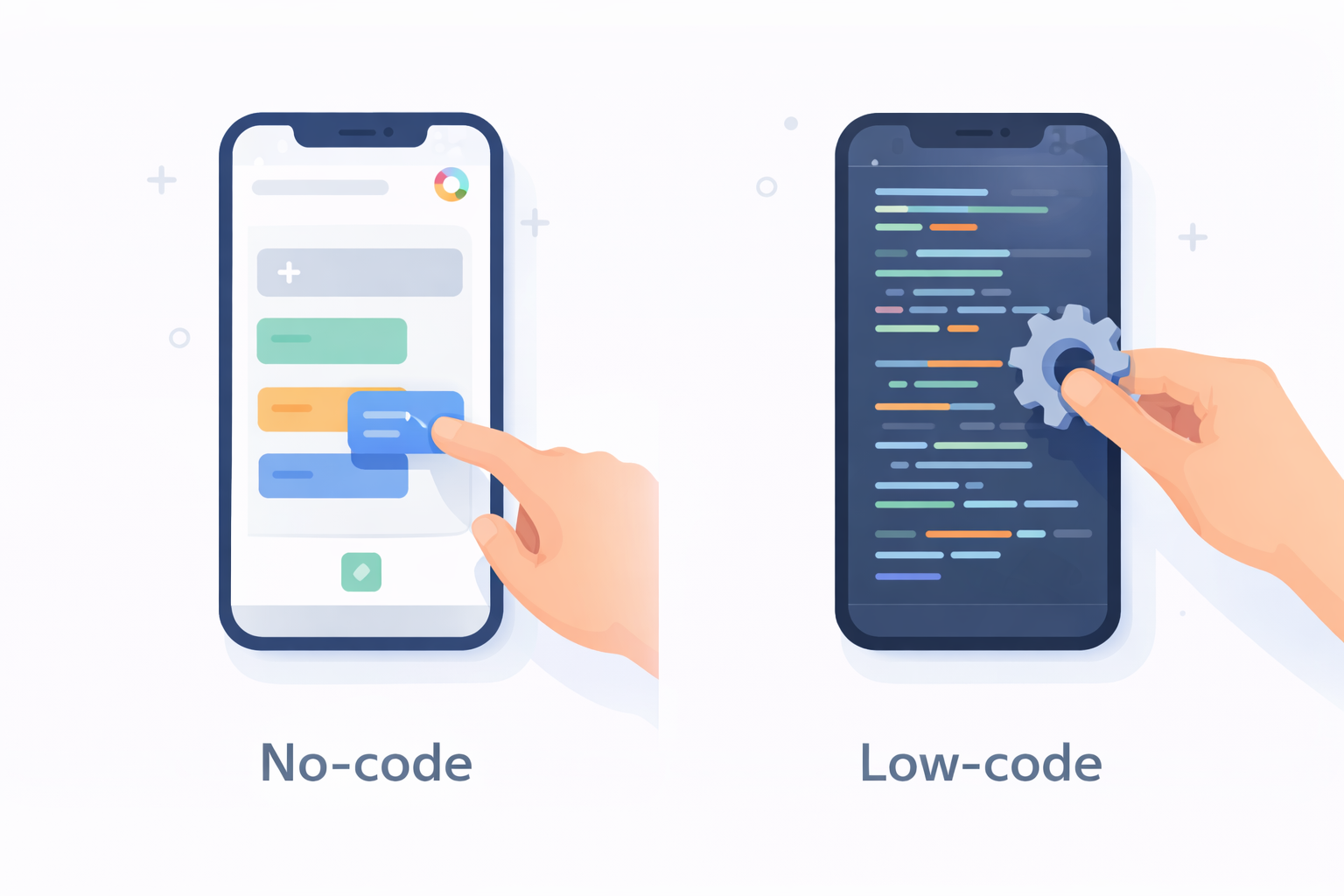
Selecting the right tool usually comes down to a choice between convenience and control, much like driving a car. No-Code platforms act like an automatic transmission: they handle all the mechanical shifting for you so you can focus entirely on the destination. Many modern rapid application development tools fall into this no-code category, allowing non-technical users to assemble applications through visual interfaces and automation.
For example, platforms such as nandbox enable creators to build native iOS and Android apps using drag-and-drop components and AI-assisted workflows rather than traditional programming. Tools like these demonstrate how rapid application development is evolving to make software creation accessible to entrepreneurs, educators, and business teams who need functional apps without deep coding expertise.
These tools are perfect for the best no-code app builders for startups where the goal is to launch a standard idea—like a customer survey, a marketing landing page, or a simple team directory—as quickly as possible without ever touching a single line of computer code.
Conversely, Low-Code solutions operate more like a manual transmission. While they still offer visual shortcuts for the basics, they allow a skilled driver to take over the gearbox when necessary. This flexibility makes low-code platforms for enterprise critical for complex projects—such as integrating with an old inventory database or processing millions of data points—where a strictly visual interface might hit a wall. You get 80% of the work done visually, but you retain the ability to write custom scripts for that final, crucial 20%.
Consider the specific needs of your project using this quick breakdown to decide which lane to pick:
- No-Code: Best for rapid prototyping, non-technical founders, and simple internal tools. Strength: Extreme Speed.
- Low-Code: Best for scaling applications, professional developers speeding up their workflow, and complex data integrations. Strength: High Customizability.
Ultimately, both approaches serve as powerful custom software development alternatives, freeing you from the months-long bottleneck of traditional engineering. Whether you choose the accessible automatic or the flexible manual approach, the barrier to entry has never been lower. Once you have determined the right complexity level for your idea, the next logical step is finding a way to start building without breaking the budget.
The Best Free Toolkits: Leveraging Web-Based and Open Source RAD to Save on Costs
High subscription fees often discourage small businesses from testing new ideas, but the rise of web based rapid application development tools open source offers a powerful alternative to expensive commercial contracts. Think of open-source software like a community garden: instead of paying a supermarket for vegetables, the community shares the seeds and the labor, allowing anyone to harvest the benefits for free. These platforms run directly in your browser and allow you to build applications without paying monthly per-user fees, making them ideal for testing concepts without financial risk.
Security and long-term ownership are just as critical as the initial price tag. When you build on a proprietary commercial platform, you risk “Vendor Lock-in,” which is similar to building a house on rented land; if the landlord raises the rent or changes the rules, you have no choice but to pay up or move out. By utilizing open technologies, you ensure that your project meets scalable application architecture requirements without being held hostage by a specific company. You retain full ownership of your data and the underlying code, allowing you to move your application to different servers or modify it deeply as your business grows.
Choosing these community-driven tools provides a safety net against rising costs and restricted access. While the learning curve might be slightly steeper than a paid “drag-and-drop” service, the freedom to control your digital destiny is often worth the investment. As your organization moves from simple tools to complex systems, managing this speed becomes essential, leading many leaders to explore how these rapid tools fit into professional management workflows.
Enterprise-Grade Speed: Integrating Low-Code into Agile Project Management
Even with powerful open-source tools in hand, the biggest risk to a project isn’t the technology; it is building the wrong thing. Many organizations still rely on a “Waterfall” approach, where every detail is planned months in advance like a blueprint for a skyscraper. If you discover a mistake in the foundation after the building is finished, fixing it is expensive and sometimes impossible. Learning how to speed up software development lifecycle requires moving away from these rigid plans and toward a method that allows for mistakes and corrections along the way.
In contrast, the iterative application development process—often called Agile—works more like a chef tasting a soup while cooking. Instead of waiting until the very end to serve the meal, you build a small, working piece of the software, show it to the users, and adjust it based on their reaction. Low-code platforms are the perfect engine for this approach because they allow you to make changes in minutes rather than days. You can drag, drop, and redeploy a feature during a meeting, instantly validating if it solves the user’s problem.
Making the switch to this flexible style changes how your team operates. Shifting from a rigid agile vs waterfall project management mindset to a faster, responsive rhythm involves specific steps:
- Focus on the MVP: Instead of a 100-page plan, identify the “Minimum Viable Product”—the smallest version of the app that is still useful.
- Sprint, Don’t Marathon: Break work into two-week cycles (sprints) where the goal is to finish a specific feature completely.
- Test Immediately: Put the unfinished app in the hands of actual users every two weeks to gather feedback before building more.
Adopting this rhythm ensures that you are always building exactly what the business needs right now, not what it thought it needed six months ago. However, as you rapidly build these independent tools, you risk creating isolated pockets of information. To prevent this, the next step is ensuring your data flows smoothly between apps using visual modeling techniques.
No Data Silos: Using Visual Model-Driven Development to Connect Your Apps
Imagine building a house. You rarely start by laying bricks immediately; you look at the blueprint to see how the kitchen connects to the dining room. In the software world, this approach is called visual model-driven development. Instead of writing complex code line-by-line, you define your business “objects”—like Customers, Orders, or Inventory—on a visual diagram first. This ensures that as you speed through the building process, your application understands exactly how different pieces of information relate to one another, preventing a messy situation where your data is trapped in isolated silos.
Once your app has a solid internal structure, it needs to communicate with the tools you already use, such as email platforms or accounting software. This connection relies on “APIs,” which sounds technical but functions exactly like a “Universal Translator.” An API allows your new custom app to speak the same language as an established system like Google Sheets or Slack without you needing to learn their internal codes. By integrating third-party APIs in low-code platforms, you can automate repetitive tasks, such as triggering a team notification automatically whenever a new client form is submitted.
Connecting these systems traditionally took weeks of development, but visual builders turn it into a quick matching game. A distinct advantage of rapid prototyping here is seeing real business data flow through your system instantly, proving your concept works before you invest heavily. You create a unified workflow where information moves automatically, saving hours of manual data entry. However, while these tools handle the majority of business logic effortlessly, there is a specific complexity threshold where visual blocks may become too cumbersome to manage effectively.
The 80/20 Rule: Identifying When a Prototype Needs a Professional Developer
While visual builders are powerful, they function best within the “80/20 rule” of software creation. These tools are perfect for handling 80% of standard business needs—like forms, tracking, and basic automation—but they may hit a ceiling when you need the final 20% of highly specialized performance. Think of it like home renovation: you can paint the walls and assemble the furniture yourself, but you typically need a licensed expert to rewire the main electrical grid. If your application eventually requires millions of simultaneous users or complex, split-second calculations, you have likely reached the limits of “drag-and-drop” logic. This signifies readiness to graduate from one of the top options for custom software development to a specialized infrastructure.
Reaching this complexity threshold is actually a financial win rather than a setback. Instead of hiring an expensive engineering team to guess what you want from day one, you can hand them a fully functional working model that you built yourself. This prototype removes the ambiguity that usually causes budget overruns, acting as a crystal-clear blueprint for the professionals to follow. You have effectively completed the “architectural” work, allowing developers to focus strictly on optimizing the code under the hood. By validating your idea with a visual tool first, you avoid paying for features you don’t need and ensure the final product matches your exact vision.
Most business ideas, however, never even reach that “mega-scale” level of complexity, meaning a visual builder is often the only tool you will ever need. The priority for internal tools or new products is rarely technical perfection; it is speed and utility. By removing the dependency on slow traditional coding cycles, you succeed in reducing time to market for apps, getting solutions into the hands of users in days rather than months. With the boundaries defined and the potential savings clear, you are now ready to map out exactly how to execute your first project.
Launch Your First App This Weekend: A 3-Step Action Plan for Non-Technical Creators

You no longer need to wait on the sidelines or save up a massive budget to solve a business problem. By understanding rapid application development tools, you have moved from being a passive consumer of software to a potential creator. The barrier to entry has dropped, and the ability to turn a frustrating manual process into a sleek digital solution is now within your reach. You don’t need a computer science degree; you just need to understand your own business logic.
Don’t let this new knowledge sit idle. Demonstrate the “Friday afternoon” promise to yourself by engaging in a low-stakes experiment this week using this straightforward checklist:
- Pick a tiny problem: Identify a simple spreadsheet or paper form that you find bothersome, such as tracking office supplies or vacation requests.
- Select your playground: Sign up for a free trial of one user-friendly platform mentioned earlier.
- Build just one screen: Focus on building prototypes without coding logic yet—just create the form or button to see how it looks.
Software development is no longer a “black box” reserved for engineers; it is becoming a modern business skill similar to creating a presentation. When you take that first step to automate a task, you aren’t just saving time—you’re taking control of your workflow. You have always had the ideas; now you have the power to build them.
Q&A
What are Rapid Application Development (RAD) tools, and why are they so much faster than traditional coding?
RAD tools replace handwritten code with visual “Digital Legos,” letting you drag and drop pre-built components instead of crafting everything from scratch. You design on a Canvas, define behavior with a Logic Builder, and hook up data via simple Data Connectors—reducing time lost to syntax errors and setup. This shifts effort from engineering low-level details to configuring business logic, enabling a “Friday Prototype” pace where you can start Monday and demo by the weekend.
How do I choose between no-code and low-code for my project?
Treat it like choosing between automatic and manual transmissions. No-code is “automatic,” ideal for rapid prototypes and simple internal tools where speed matters most and you would rather not touch code. Low-code is “manual,” giving you visual speed for 80% of the build plus the option to script the last 20% for complex integrations, scale, or unique logic, making it a better fit for enterprise-grade or intricate projects.
Are open-source, web-based RAD platforms worth considering, and what about vendor lock-in?
Yes, open-source, browser-based tools cut subscription costs and are great for testing ideas without financial risk. They also reduce vendor lock-in, so you keep ownership of your data and code and can move or deeply modify your app as you grow. While there may be a slightly steeper learning curve, the long-term benefits include increased flexibility and alignment with scalable architecture needs.
How do I prevent data silos and connect my app to the tools we already use?
Start with visual model-driven development—define your core business objects (e.g., Customers, Orders, Inventory) and their relationships on a diagram so data stays consistent across features. Then use API integrations (a “universal translator”) to sync with systems like spreadsheets, email, or chat, automating tasks such as notifications or data updates. Visual builders let you validate these flows quickly with real data, creating a unified, low-friction workflow.
When should I hand my prototype to professional developers?
Use the 80/20 rule: visual builders cover most standard needs, but if you require extreme scale (e.g., millions of users) or ultra-specialized, split-second logic, it’s time to bring in pros. That’s a win—you’ll hand over a working prototype that clarifies requirements, reducing guesswork, rework, and cost overruns. Developers can then focus on optimizing performance and infrastructure rather than interpreting vague specifications.